📉 Enterprise AI · 📣 Product Leadership
IBM CLOUD PAK FOR AIOPS - 0 TO 1 DESIGN AND LAUNCH
TL;DR
Proactive incident resolution experience for DevOps at complex enterprise scale. Led every product phase from ideation to delivery, with end-to-end designs built, tested, and launched via heavy collaboration with PM, dev, and research. Work subsequently led to measurable customer success, key revenue growth, and international design award.
Outcomes & Impact
Design solutions with IBM design system (Carbon) components for alerts grouping, system topology, and advanced table sorting and filtering
50% incident reduction for customers with alert automation experience
20% revenue growth via new client acquisitions by 2Q 2023
Won the Red Dot Design Award, 2023
Duration
Team
Tools
1 quarter (1.0 launch) + more for subsequent release cycles
3 PM's, 2 Dev Architects, Engineering team, 4 Designers, 2 UX Researchers, 1 Content Designer
Figma, Sketch, Mural, Aha!, Github

The Project
IBM wanted to expand its B2B DevOps platform with AI-driven automation capabilities, providing a more comprehensive infrastructure management tool for IT organizations. Essentially, our biggest challenge was to display a lot of data in a quickly ingestible way and provide our users the best course of action. We took the core experience from IBM's legacy product Netcool (built in the 90's!) and redesigned the UX with AI-enabled noise reduction and recommendation incorporating IBM's Carbon design system. As a lead designer heading several experience areas, I was involved in the full product cycle - from ideation, determining product requirements, prototyping and testing product E2E UX, development/QA, launch, client engagement and research.
Our users are typically SME’s (operators, developers, and LOB managers) with deep-rooted, org specific tribal knowledge in the companies they work for. To build trust in what could be disruptive to their highly manual workflow, a lot of our UX decision-making involved balancing AI automation to minimize pains and human-in-the-loop to retain the operators' control.
My Role
Lead designer, alerts & incident management, automations, metrics, and other
Lead facilitator of product strategy / UX ideation / product requirements
QA lead (code, design, and content)
DISCOVERY TO LAUNCH (1Q)
Ideation Phase
Requirement Phase
Design & Build Phase
Final Phase
Led week-long workshop on app management experience with product team (with PM, Engineering, Design, Sales)
Wrote out requirements + KPIs with PMs and compared notes with other PMs to minimize duplicates
Product designs with Carbon explorations → stakeholder alignment → user testing with new and Netcool users
Product GA / launch!
(Continuous product iterations + leading incident remediation experience + user research via sponsor user program)
Discovery Phase
(Design Research x PM) Team-wide alignment on opportunity area in the ITOps space
Review/QA Phase
Evaluated end-to-end UX and edge cases with Visual, Engineering, and Content and open QA issues in GitHub
After first launch
Case in Point: Alerts experience
The “alerts” view originates from Netcool, which captures live incoming events for network operators to flag and fix any issues within their system network. The below screen shows Netcool view as is (typical view our users were found to be using prior to AIOps migration). When we built Cloud Pak for AIOps, we transformed the legacy alerts experience to reflect the AI capabilities and improve usability for faster analysis and action using IBM's Carbon Design System components as well as custom UI.
Below, Netcool presents a flat, uncorrelated event stream where severity is legible but context, causality, and next steps are not. The new AIOps view displays a ranked, correlated incident view where the system pre-triages noise into signal, and every alert links back to its source.
Netcool Alerts View Analysis

UX Transformation with Carbon


As part of our UX problem solving, we explored and incorporated various Carbon components, including above, to enhance usability and accessibility.
AIOps Alerts View

...And many more solutions
Aside from the alerts experience, I led the design efforts for several other areas both in the Netcool UI as well as other pain points our users have addressed with us as shown below. From changing how users can view the topological impact of an incident making up of alerts to helping them set up new automations, I sketched new UX ideas, led mini workshops to ideate with team, applied additional Carbon components into the AIOps solutions.



Netcool Experience Before Changes

Manual alert configuration, filtering and dashboarding. Configuring how to trigger alerts and group them were done via manual settings, like Java parameters and arguments. While dashboarding like the one above was possible to create, it would often require a third-party extension to enable this customization (often by an external developer).
AIOps Experience with Automations and Carbon Design
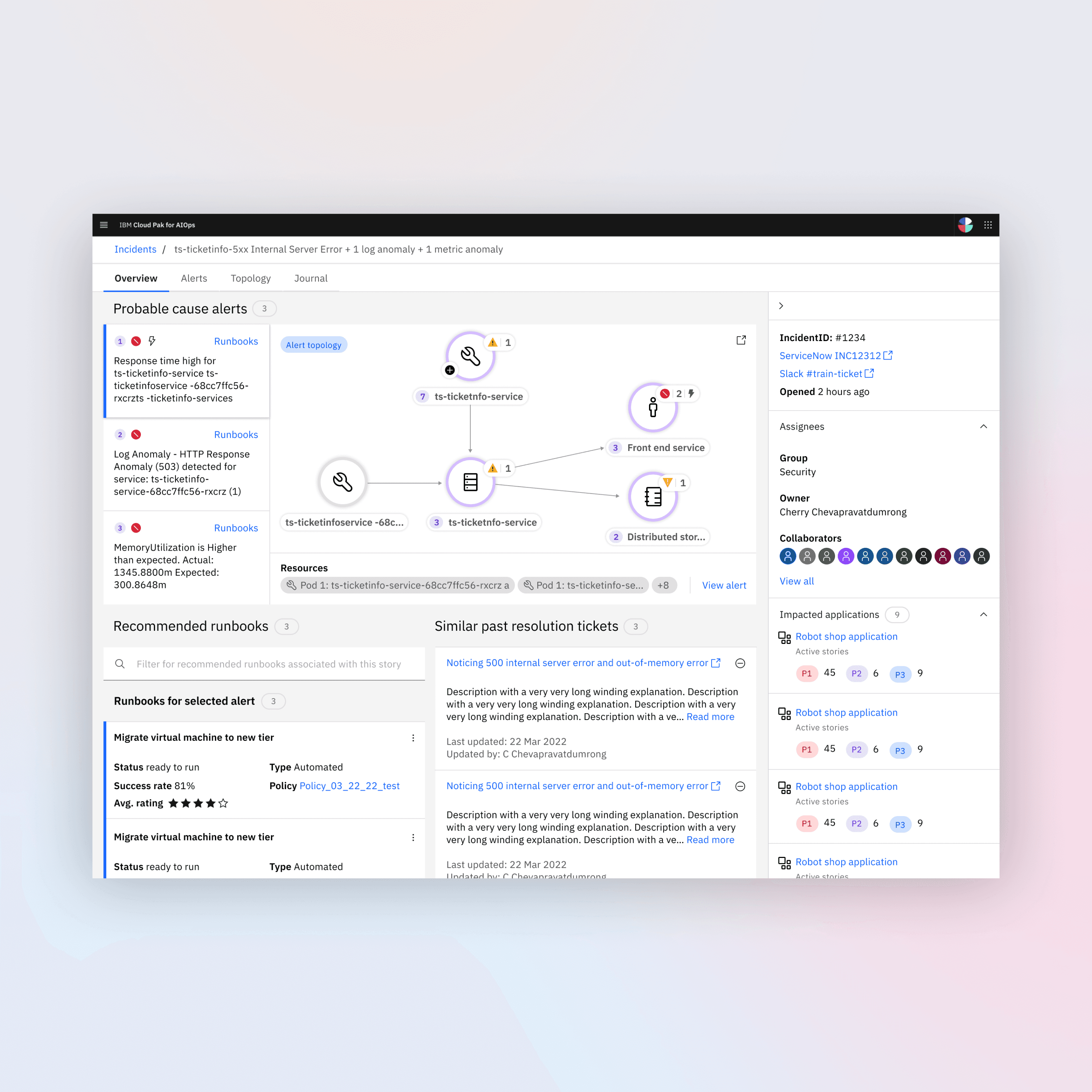
Analyzing an incident. Operators can view the bigger context of the alerts within an “incident view”, where they can check the different components within their system. Because they are interconnected, one issue can impact many parts. From here, they can also run automated solution steps recommended by AI, called "runbooks". While these could be autorun, we have incorporated human intervention before proceeding.


The bigger picture. Operators as well as stakeholders / LOB managers can regularly check the status of their network applications to provide executive report as well as to evaluate the overall health and improvement of their areas of ownership. (Censored due to WIP.)
Predicting in time series. Another angle from which our operators can view potential issues is via metric anomalies. Using a predictive model, we also provide metric projection should the anomalies be left unresolved (in purple in the graph).

Runbook automations. This captures the “what to do next” once an alert or an incident occurs. Users can set the runbooks to deloy automatically or manually, then rate the quality of the runbook. Runbooks are editable and will get auto-matched with relevant alerts for operators to view either in the alerts view (click a row) or within the incidents page.
LOOKING FORWARD
Now with AI assistive tooling, I reflected on ways in which my team and I could leverage this in the future.
Preliminary Design Explorations
Could prompt agent how they might draw up a incident log UX with specific constraints our users may have, using Carbon token library
Rapidly generate a selection of prototypes for user testing
QA Automation
Could build simulation models* to test out the product E2E and log potential bugs / errors either in parallel with our human QA testers / engineers or them to evaluate report from AI
*Would need to compile accurate and up-to-date user data (this would stem from a bigger continuous effort to build and train interactive customer archetypes)